“Can we connect our new system to the old one?” is one of the most common questions we hear, and it’s usually asked with some dread, because “integration” often gets mistaken for “rebuild.” It doesn’t have to be.
Most businesses running on an ERP, an old inventory database, or a decades-old internal tool don’t actually have a broken system. They have a system that works, but can’t talk to anything new. The fix for that is rarely to replace it; it’s to build a layer that lets new software talk to it safely.
Why “Just Rebuild It” Is Usually the Wrong Answer
A legacy ERP or database earns its reputation the hard way: years of edge cases, manual fixes, and business rules baked into logic nobody fully remembers writing. Replacing it means re-discovering and re-implementing all of that, while the business keeps running on it in the meantime.
That’s expensive and risky for a problem that often isn’t actually about the old system being wrong. It’s about the old system being closed off. Across manufacturing, logistics, and retail clients we’ve worked with, the old system was usually fine at its one job: tracking inventory, recording transactions, running production. What it couldn’t do was expose that data to a new mobile app, a new customer portal, or a partner’s software.
Engineering Tip: Before scoping any legacy integration, confirm which system is the actual source of truth for each piece of data. Two systems disagreeing about “current stock” is a far more common failure than any technical integration problem.
The Integration Layer Approach
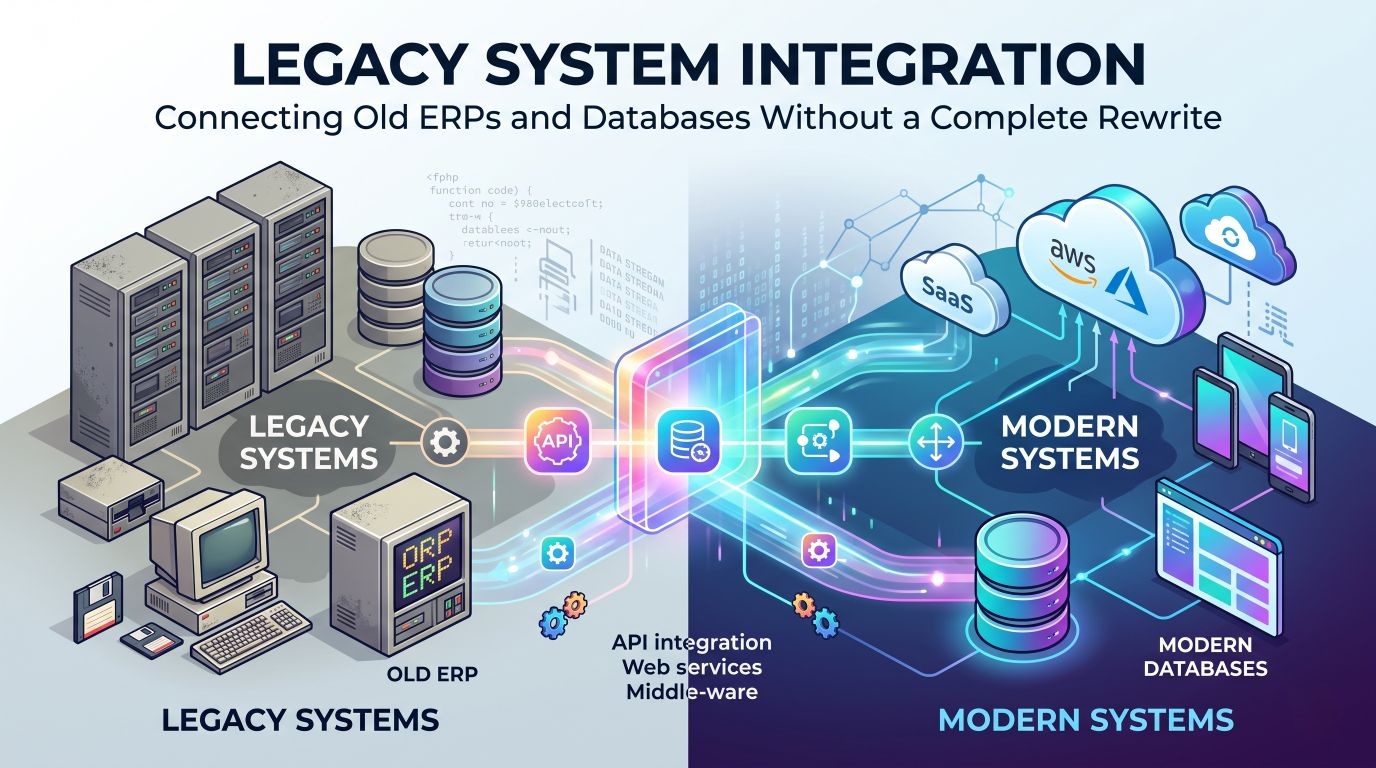
Instead of connecting a new application directly to an old database, you build a separate service that sits in between. This integration layer (sometimes called a middleware or API gateway) does three jobs:
- Reads and writes to the legacy system using whatever it actually supports, whether that’s a direct database connection, a flat file export, an old SOAP API, or in some cases a scheduled script that touches the database directly.
- Exposes a clean, modern API (typically REST or GraphQL) that new applications can call without knowing anything about the legacy system underneath.
- Keeps the two systems loosely coupled, so the legacy system can be upgraded, migrated, or eventually retired later without forcing every connected application to change at the same time.
graph LR
    NewApp["New Web / Mobile App"] --> API["Integration Layer (API)"]
    API --> Legacy["Legacy ERP / Database"]
    API --> Cache["Sync Cache / Replica"]
    Cache --> Legacy
This is the same pattern behind most of the “modernization” projects that look instant from the outside. The old system didn’t disappear; it got an interface.
Where This Actually Gets Hard
The architecture diagram is the easy part. The real work is in three places:
- Data meaning, not just data structure: A column called
statusin the old system might mean five different things depending on which module wrote to it. Understanding what the data means, not just what type it is, takes longer than writing the integration code itself. - Timing and consistency: If the legacy system and the new application can both change the same record, you need a clear rule for which one wins, and how fast changes propagate. Real-time sync is not always necessary, and a scheduled sync every few minutes is often simpler and safer.
- Protecting the legacy system’s performance: An old database often wasn’t built to handle extra query load from a new application on top of its existing jobs. Reading from a replica, a nightly export, or a caching layer instead of the live production database avoids slowing down the system the business still depends on every day.
| Approach | When It Fits | Trade-off |
|---|---|---|
| Direct live query | Low-traffic systems, simple reads | Can slow down the legacy system under load |
| Scheduled sync / replica | Most business reporting and catalog data | Data is a few minutes to hours old |
| Event-driven sync | High-frequency updates (inventory, orders) | More complex to build and monitor |
Conclusion & Next Steps
Legacy integration has a bad reputation mostly because it gets confused with a full rebuild. In practice, the two are different projects with very different cost, risk, and timelines. An integration layer lets a business keep the system that already works, while opening it up to everything new it needs to connect to.
If you’re looking at an old ERP, inventory system, or internal database and wondering whether it can support something new, the first useful step is almost always a short technical audit of what the system can actually expose, not a quote for replacing it.
Frequently Asked Questions
Do I have to replace my old ERP to add new software?
No. In most cases, a new application can be built to work alongside the existing ERP through an integration layer, rather than replacing it. A full ERP replacement is a much larger, riskier project, and is usually only justified when the ERP itself can no longer be supported or extended at all.
What is an integration layer?
A separate service (an API or middleware) that sits between your old system and any new application. It translates requests, so the new software never talks to the legacy database directly, and the legacy system doesn't need to be modified to support it.
How long does legacy system integration usually take?
It depends heavily on how well documented the legacy system is and how it stores data. A single, well-defined integration (for example, syncing inventory between an old database and a new web app) can take a few weeks. Integrating several systems with inconsistent or undocumented data takes longer, because most of the time goes into understanding the data before any code is written.
Is integrating with a legacy system risky for the old system itself?
The main risk is to performance and stability if the integration layer queries the legacy database too aggressively or at the wrong times. This is managed by reading from a replica or scheduled export instead of the live database where possible, and by rate-limiting how often the integration layer pulls data.
How do I know if I should integrate instead of rebuilding?
If the legacy system still does its core job correctly and reliably, and the problem is that it cannot connect to new tools or does not have a usable interface, integration is almost always the right call. A rebuild makes sense only when the legacy system itself is the source of the problem, such as when it can no longer be patched, scaled, or when no one can safely change its code anymore.